Linktree: Link in bio creator
- 4.6
- Rating
- 1.00M
- Installs
- Free
- Price

 Analysis by App-foxy
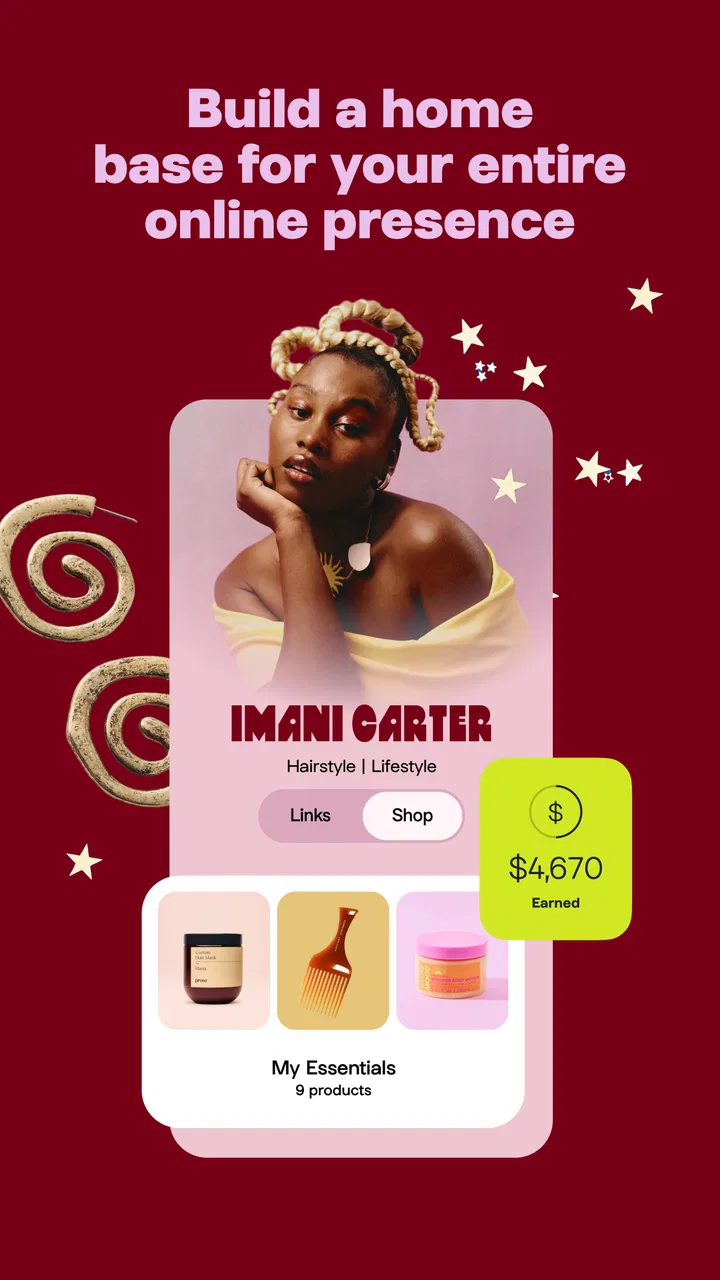
I started using Linktree because I wanted one dependable place to gather the different parts of an online presence. A social profile often gives you room for only one main link, while a creator, small business, musician, student, or community organizer may need to point people toward several destinations. This app turns that awkward limitation into a simple landing page that can be shared from a profile, message, email signature, or printed code.
My experience with it is best described as practical rather than exciting. It is a social app from Linktree, and its job is to help you organize links under one public address. The free starting point makes it easy to try, while optional purchases range from $4.99 to $359.99 per item, so I would pay attention to which extras you actually need before upgrading. The app is rated for Everyone, runs on Android 7.0 or later, and the current version is 3.45.0.
What makes it useful in everyday life is not simply the ability to add several links. The real advantage is having one destination that can be updated when your priorities change. I can move attention from a recent project to a booking page, newsletter, store, portfolio, or community channel without changing the address placed in my social profile. That small distinction saves time and avoids asking followers to hunt through old posts.
You May Also Like

 Blood Strike: 2.5 Anniversary
Blood Strike’s Loadouts Turn Every Drop Into a Tactical Gamble
A close look at Blood Strike’s custom loadouts: how fast access to signature weapons reshapes its battle royale rhythm, rewards preparation, and narrows the gap between fights.

 Pandora - Music & Podcasts
Pandora’s Music Is Easy to Start, but Harder to Recover
Pandora’s strength is its low-effort path from a seed to a station. Its weak spot is how much confidence it asks you to place in connection, setup, and quiet recovery.

 8 Ball Pool
 Is Built on Rivalries, Rematches, and Routine
A close look at the rivalries, rematches, shared routines, and unanswered safety questions that turn a quick pool match into a persistent mobile community.

 Samsung Music
’s Quiet Strength Is Playing What You Already Own
Its reach comes less from spectacle than from dependable access to a personal library. That simplicity is both the app’s strongest retention engine and its ceiling.

 AccuWeather: Weather Radar
AccuWeather Review: A Quick, Clear Forecast for Everyday Decisions
For everyday plans, the best forecast is the one you can understand quickly. AccuWeather makes rain timing, radar, and local conditions easy to act on, with a few trade-offs.

 Hill Climb Racing
Why Hill Climb Racing Still Turns Crashes Into One More Run
A tiny car, a bumpy hill and one more upgrade: Hill Climb Racing keeps resurfacing because its simple chaos makes every near-miss feel personal.
More From Our News Desk
View All News


How Linktree works when several people share the same online space
A realistic household example is a shared creative project. Imagine one person handles photography, another sells handmade items, and a teenager helps edit short videos. Instead of placing separate links everywhere, the household can use one Linktree page as a front door. Visitors might find the shop, the latest gallery, a contact method, and the project’s social accounts in one place.
I would not treat that shared page like a family dashboard, though. It is a public-facing link page, not a private organizer for household tasks. The most sensible arrangement is to decide in advance who owns the account, who is allowed to change the links, and which destinations are appropriate for public viewing. That simple conversation matters more than the page design itself.
For a solo user, the same idea works on a smaller scale. A freelancer can separate services from personal posts. A student can combine a portfolio, a résumé, and a professional contact route. A local club can present its schedule, sign-up page, social feed, and donation destination without asking members to remember several addresses.
The app also suits people who regularly change campaigns or projects. I found the single-address approach especially helpful when sharing links in places where editing is inconvenient. Once the Linktree address is already in a profile, the page behind it can be refreshed without replacing the profile link. That is a better workflow than repeatedly updating every biography whenever one destination changes.
Setting up the page without losing control of the account
The first decision should be whether the page represents one person or a group. For an individual, using a personal account may feel natural. For a household business or shared project, I would use an account identity that will still make sense if one contributor stops participating. Otherwise, the page can become difficult to manage when the original owner is unavailable.
I also recommend preparing the destinations before adding them. Write down the exact purpose of each link and check where it leads on a phone. A page with ten loosely related buttons may look busy and make visitors hesitate. A shorter list with clear labels usually communicates better. The strongest link should appear near the top, while supporting destinations can follow in a logical order.
One useful but easy-to-miss habit is to write labels for the visitor, not for yourself. “Read the latest issue” tells people more than “Newsletter.” “Book a session” is clearer than “Contact.” Since the page is often opened by someone who has little context, the label should explain the next action immediately.
Another practical step is to review old links regularly. A public page can remain online long after a campaign, event, or temporary offer has ended. That creates confusion and can make a carefully maintained profile appear neglected. I would schedule a quick review whenever a project changes, rather than assuming the page will stay accurate automatically.
Because the app is free to download, it is easy to begin without committing to a paid plan. That is useful for testing the basic workflow with a real audience. However, the presence of in-app purchases means I would avoid upgrading simply because the page feels unfinished during the first setup. First identify the exact limitation affecting your work, then decide whether a paid option solves it.
Coordinating changes when more than one person is involved
Shared use is where a little discipline makes the biggest difference. I would establish a simple rule: one person makes structural changes, while others suggest edits through a separate household conversation. Without that boundary, two people may reorder links, replace labels, or remove a destination without realizing that the change affects everyone.
It is also wise to keep a private record of the intended link order and the purpose of each destination. This does not require complicated project software. A short note can explain which link is permanent, which one is seasonal, and which one should be removed after a particular activity ends. That record helps the next person understand the page instead of rebuilding it from guesswork.
For a shared shop, I would separate public communication from account access. The page can point to the shop, social channels, and contact route, but not everyone who needs to suggest wording necessarily needs control over the account. Fewer editors generally means fewer accidental changes. This is particularly important when a young family member helps with content but an adult remains responsible for the public profile.
There is a useful trade-off here. A single page is easier for an audience to remember, but it can also become a bottleneck if every update depends on one person. If the household has several unrelated projects, separate pages may be clearer than forcing everything into one crowded destination. Linktree is strongest when the links share a recognizable identity or purpose.
I would also test the page from the perspective of someone who does not know the household. Ask a friend to open it and find the most important destination without explanation. If they choose the wrong button or cannot tell which person to contact, the problem is not the visitor; the structure needs clearer labels or fewer choices.
Age, trust, and the boundary between public and private
The Everyone age rating makes the app approachable in a broad sense, but that should not be confused with every linked destination being suitable for every visitor. Linktree is a container for links, and the experience beyond each button depends on the destination. A household should review those destinations separately, especially when a page is managed by or shared with a younger person.
I would avoid placing private information on a public landing page. A personal phone number, home address, school details, or a schedule that reveals when nobody is home can create unnecessary exposure. A safer approach is to link to a controlled contact method or a public-facing form and share only information that the household is comfortable making widely available.
Trust also applies to the links themselves. Before publishing a button, open it and confirm that the name, image, and destination match what you intended. A forgotten redirect or outdated account can send visitors somewhere confusing. For a shared page, this check should happen whenever someone proposes a new link, not only during the original setup.
Parents or guardians may find the app useful for helping a young creator organize a public portfolio, but I would keep the account boundary clear. The adult should understand what is being published, which services are connected, and who can edit the page. The app should not be treated as a substitute for conversations about online identity, messages, purchases, or the privacy of linked services.
That last point matters because the optional purchase range is broad. A child or inexperienced user may see an upgrade prompt without understanding whether it is necessary. I would handle billing through the responsible adult’s normal device and account practices, and I would explain what the paid feature is meant to accomplish before approving any purchase. The free version is a sensible starting point for learning the basics.
Where it beats a normal profile link, and where it does not
The usual alternative is to choose one destination and place it directly in a social profile. That is cleaner when the goal is extremely focused. If I only want people to book an appointment, a direct booking link removes a step and may be better than asking visitors to choose from a menu. Linktree earns its place when several destinations genuinely matter.
Another alternative is a personal website. A website can offer more room for explanations, navigation, branding, articles, and detailed contact information. It is the better choice for a business that needs a full online home. Linktree is lighter and faster to maintain, but its simplicity also limits how much context I can give visitors before they click.
Social platforms themselves may provide link collections or profile sections. Those tools can be convenient if all your followers already use the same platform. The advantage of Linktree is portability: one page can be shared across different profiles and communication channels. The drawback is that visitors leave the platform they were using and encounter another interface before reaching the final destination.
A link-shortening service is not a direct replacement. Shorteners make an address easier to share, but they do not organize several choices for the visitor. A Linktree page is more useful when the problem is selection rather than length. Conversely, if the destination is already obvious and the shortest possible path matters, adding an intermediate page may be unnecessary friction.
My most important comparison point is maintenance. A full website can be more powerful but takes more effort to keep current. A direct link is easy but inflexible. Linktree sits between those options: it gives me a manageable public hub without requiring a complete site, while still asking me to make thoughtful decisions about order, labels, and privacy.
Small workflow choices that make the page more effective
My first concrete tip is to organize links by visitor intent rather than by the order in which I created them. Put the action most people came for first, then the destination that builds trust, then secondary channels. This reduces the chance that a visitor opens the page, sees a long list, and leaves without finding the relevant button.
My second tip is to use the page as a campaign switchboard. For a temporary launch, place the current project at the top and move evergreen links below it. When the launch ends, restore the long-term destination instead of leaving an expired announcement visible. This makes the same profile address useful across different stages of a project.
My third tip is to create separate mental sections even if the page remains one list. For example, a creator might think in terms of “watch,” “buy,” “learn,” and “contact.” The labels do not need to announce those categories formally, but the sequence should make the journey obvious. That structure is particularly helpful for household pages where different people contribute different kinds of links.
My fourth tip is to treat the page as a measurement point only if the available account tools support the decision you need to make. Do not assume that a collection of links automatically explains why visitors choose one button over another. If you need serious campaign analysis, a dedicated website or analytics setup may be more appropriate. Linktree is excellent for organizing access, but organization and deep measurement are not the same thing.
Finally, I would keep a backup list of the destinations and the intended public name of the page. Losing track of the original structure is frustrating when a shared project changes hands. A simple record makes recovery and handover easier, especially when several household members have contributed over time.
Who should use it and who should choose something else
I would recommend Linktree to creators, freelancers, small teams, community groups, and households with a clear shared identity. It is also a good fit for anyone whose social profile is the main way people discover them and who needs more than one useful destination. The app has passed one million installs and holds a 4.5 average from around 59 thousand ratings, which reflects a substantial user base without changing the need to judge whether its workflow suits you.
I would be more cautious if you need a private family organizer, detailed permissions, a complete storefront, or a full personal website. This app should not be selected merely because a household has many unrelated links. In that situation, separate pages or a proper website may communicate more clearly and reduce the risk of exposing information to the wrong audience.
I would also skip it when one direct destination is all that matters. A customer who wants to reserve a table, buy one product, or read one document should not have to make an extra choice unless there is a real reason. The best link page is not the one with the most buttons; it is the one that makes the next step obvious.
My household verdict after using the app
Linktree is a useful shared front door, provided the household treats it as a public publishing tool rather than a private coordination space. Its strength is the balance between a single memorable address and the flexibility to update several destinations behind it. That makes it convenient for evolving projects, mixed social profiles, and small teams that do not need a full website.
My reservations are equally practical. A crowded page can weaken the experience, shared editing needs clear ownership, and the links themselves require regular checking. The Everyone rating does not remove the need to review connected services, and optional purchases deserve adult attention when younger users are involved. These are not reasons to avoid the app; they are reasons to use it deliberately.
After weighing those points, I see it as a strong free starting point for a creator or household project with several public destinations. I would begin with a focused page, assign one responsible editor, keep private details away from it, and review the links whenever the project changes. If that simple structure matches your needs, the app can replace a surprising amount of profile-link clutter without demanding the work of maintaining a full website.
FAQs for Linktree: Link in bio creator
01What is Linktree and how does it work?
Linktree is a tool that allows you to create a personalized and easily accessible landing page containing multiple links. It's perfect for social media bios where you can only place one link. Users can click on your Linktree URL to access all your important links, such as websites, blogs, or social media profiles.
02Is Linktree free to use?
Yes, Linktree offers a free version that provides basic features suitable for most users. However, there is also a paid plan called Linktree PRO, which offers advanced customization options, analytics, and other premium features. The free version is great for getting started, while the PRO version is ideal for businesses and influencers.
03How do I customize my Linktree page?
Customizing your Linktree page is simple. You can choose from various themes and color options to match your brand. With the PRO version, you can further personalize your page by adding custom backgrounds, fonts, and buttons. This customization makes your Linktree more appealing and aligned with your personal or business branding.
04Can I track the performance of my links on Linktree?
Yes, Linktree provides analytics that allow you to track the performance of your links. You can see metrics like the number of clicks each link receives and overall traffic to your Linktree page. The PRO version offers more detailed insights, including click-through rates and geographic data, which can be valuable for optimizing your links.
05Is Linktree compatible with all social media platforms?
Linktree is compatible with almost every social media platform. It's widely used on Instagram, TikTok, Twitter, and Facebook, among others. By placing your Linktree URL in your bio, you can direct followers to a hub of content, making it easier for them to access your work or other social media profiles.
Pros
- Easy to set up and customize.
- Supports multiple social media links.
- Mobile-friendly interface.
- Analytics to track link performance.
- Integrates with popular platforms.
Cons
- Limited features in free version.
- Customization options can be basic.
- Occasional loading delays.
- Analytics require premium plan.
- May not support all niche platforms.

Linktree: Link in bio creator
Gallery